


RoomGPT AI - Interior Design
4.6258.00 Reviews
App Specs
- Version
- 100.1.22
- Updated On
- License
- Free
- Downloads
- 500,000+
- Developer
- AZUR APPS FZ-LLC
- Categories
- House & Home
- Platform
- Android
Screenshots
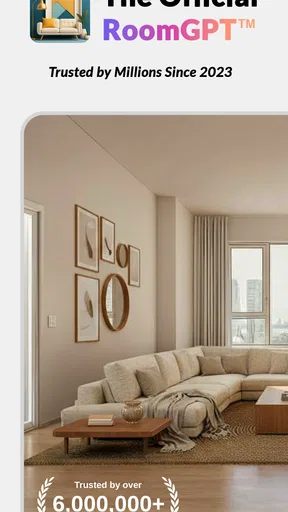
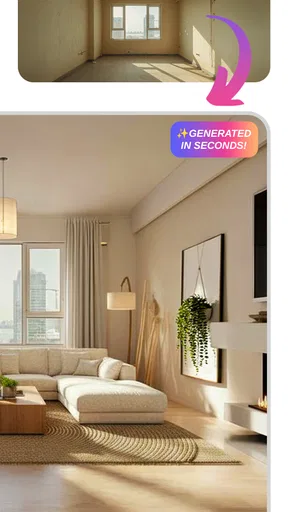
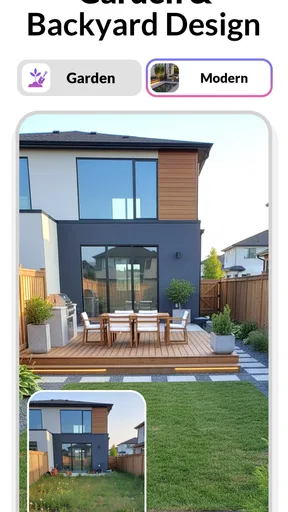
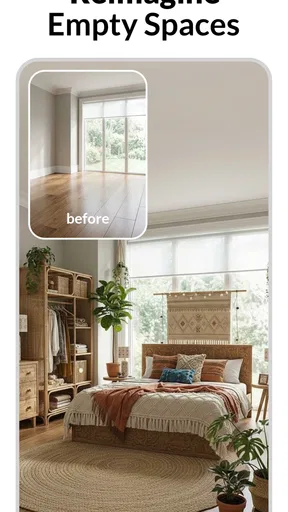
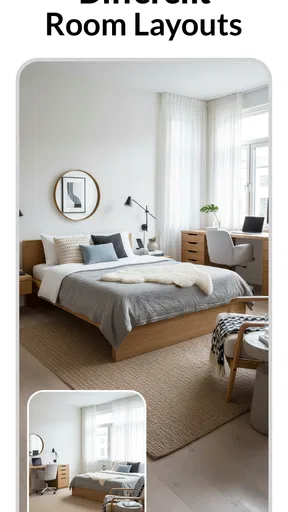
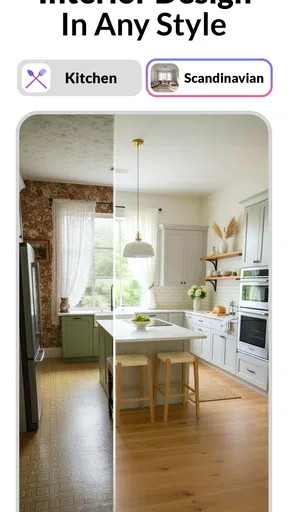
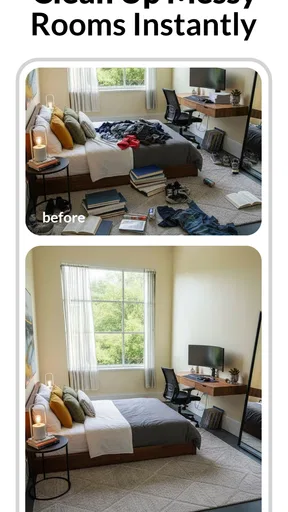
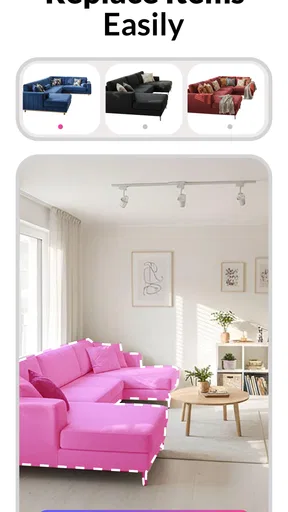
 Analysis by AppCompare
Room design is easy to postpone: I can know a room feels tired without knowing whether the fix is a new color, a different layout, or simply less clutter. That uncertainty is where RoomGPT AI can be useful. It turns a photo into a starting point for imagining a changed space, so I can explore a direction before making a commitment. The appeal is immediate, but the more important question is whether the app stays useful once the first surprising transformation wears off.
Why the first week feels engaging
In the first few sessions, the strongest draw is seeing a familiar room represented differently. I can use that visual shift to get past a blank-page problem: instead of trying to describe an idea in my head, I have a concrete image to react to. Even when a suggestion is not exactly my taste, it can help me identify what I do want, such as warmer colors, a calmer feel, or a less crowded-looking room.
That makes the app most appealing to people at the very beginning of a decorating decision. If I have just moved, am considering a refresh, or keep saving inspiration without settling on a direction, a generated concept can give me something specific to discuss with a housemate or family member. It is also a low-pressure way to explore a bolder style before spending money or moving heavy furniture.
I would treat those images as ideas rather than finished plans. A visual concept can be persuasive while leaving practical questions unanswered: will the furniture fit, can the room function with that arrangement, and is the suggested look realistic with my existing belongings? The useful habit is to note what appeals in the image and translate that into decisions I can check in the actual room.
What is RoomGPT AI?
So, what exactly is RoomGPT AI? In a nutshell, this nifty app uses artificial intelligence to help you redesign your space. Whether you’re looking to revamp a single room or your entire home, this app provides personalized design ideas based on your preferences. It's like having an interior designer in your pocket, minus the hefty price tag.
Getting Started
Setting up RoomGPT AI was a breeze. I downloaded it from the app store, and within minutes, I was exploring design ideas. The user interface is super intuitive, which is a massive plus for someone like me who’s not exactly tech-savvy. You just take a picture of the room you want to redesign, and voilà! The app gets to work.
For a more useful first result, I would photograph the room when it is reasonably tidy and make sure the main furniture is visible. That is not about staging a perfect home; it is about giving the design suggestion a clear view of what is already there. I would also take a second image from another angle if I am comparing possibilities, while remembering that different viewpoints may produce different impressions rather than a precise, consistent floor plan.
Worth Reading Before You Choose

Switching to Android Auto Means Rethinking Your Driving Routine

Google Calendar Makes a Crowded Week Easier to Manage

Baby Panda World Brings Quick Play to Modern Phones, but Its Game Library Feels Busy

ESPN’s Live Game View Makes Following Close Games Easier

QuizzLand Review: A Good Fit for Short Trivia Breaks, Not Every Player

Basketball Stars: Multiplayer Is Fast, but Can It Recover When Matches Go Wrong?
A practical way to use the result is to separate inspiration from shopping. I might save the broad ideas—color balance, materials, or the mood of the room—then check dimensions and prices independently before buying anything. This helps avoid a common trap with AI visuals: assuming that an attractive arrangement automatically accounts for door clearance, storage needs, pets, children, or the awkward corner that matters in everyday life.
Features Galore
Let’s dive into some of the features that make this app a game-changer. First off, the design suggestions are incredibly detailed. The app analyzes your room’s layout, lighting, and even your furniture placement. It then offers design recommendations, complete with color schemes, furniture suggestions, and décor ideas.
What really blew me away was the ability to customize these suggestions. If you’re not a fan of the minimalist style it suggests, no worries! You can tweak the recommendations to fit your personal taste. Plus, the app provides links to purchase suggested items, which is a huge time-saver.
From inspiration to a real decision
In ordinary room-planning apps, I often have to build the space myself by choosing objects, arranging them, and adjusting the scene before I can judge the result. RoomGPT AI’s photo-led approach is appealing for the opposite reason: it starts from the room I already have, which can make brainstorming feel quicker and less technical. The trade-off is that a generated picture is not the same as a measured plan. If I need to know whether a sofa will fit through a doorway or whether a layout leaves enough walking space, I would reach for a tape measure and a floor-plan tool rather than rely on an image.
That difference suggests a helpful two-step workflow. First, use the app to choose a direction and spot visual changes worth testing. Then verify the practical details in the room: measure, move one item temporarily, check how the light looks at different times, and decide what can be reused. The app is better at helping me answer “What might feel different?” than “Will this exact purchase work here?” Keeping that distinction clear makes its ideas more valuable and reduces the chance of an expensive impulse decision.
The suggested-item links can shorten the path from an idea to browsing, but I would still compare alternatives and check dimensions, materials, and return terms before ordering. A recommendation that matches a visual style may not suit a budget, a household’s wear-and-tear, or the way a room is used. I see those links as a convenient discovery route, not an endorsement that a particular item is the only or best choice.
The AI Magic
Now, let’s talk about the AI behind this app. The tech is impressive. It learns your preferences as you use it, which means the more you play around with it, the more tailored the suggestions become. The AI’s ability to adapt and refine its recommendations is seriously cool and makes the whole experience feel personalized and unique.
For recurring value, I would use that personalization as a way to narrow choices rather than expect every result to be a decisive answer. If a suggestion repeatedly moves toward a style I do not like, that tells me something useful about the limits of the match—or about how clearly I have expressed my taste. I can compare what I keep accepting and rejecting, then make a small, deliberate change instead of asking for endless variations that all blur together.
This is especially useful when two people share a room but disagree about its direction. Each person can point to concrete elements in an image instead of arguing over vague labels like “modern” or “cozy.” One may like the color palette while the other prefers the furniture mood; that gives the conversation a more workable starting point. It will not settle every disagreement, but it can make preferences easier to explain.
Room Transformations
I decided to test its capabilities on my somewhat bland living room. The app suggested a modern industrial look, which was a bold choice but turned out to be perfect. It recommended a mix of metal and wood furniture, a neutral color palette, and some quirky wall art. I followed its advice, and the transformation was stunning.
The best part? My friends couldn’t stop complimenting the new look. They couldn’t believe I did it all with the help of an app! It’s safe to say RoomGPT AI turned me into a design genius overnight.
A more everyday test is a room that is nearly right but has one persistent problem: perhaps the living area feels flat, or a bedroom looks busier than intended. I would photograph it before making changes, use the result to identify one or two elements to experiment with, and then try low-cost adjustments first—rearranging what I own or testing a different accent color. That approach turns the app into a decision aid rather than a reason to replace everything at once.
It can also be handy before a move or a seasonal reset. A renter who cannot repaint or make permanent changes can still explore movable décor, textiles, and furniture arrangements as inspiration. Someone furnishing a new home can use concepts to compare moods room by room, but should make a separate list of essentials and measurements before shopping. In both cases, the strongest payoff comes from turning a visual idea into a manageable next step.
What keeps it useful—and what wears thin
The app sits in the House & Home space, and Evolution Games - Idle Merge is its developer. It is free to download, rated for Everyone, and has a 4.6 average from around 7.8 thousand ratings, with over 100 thousand installs. Those figures suggest that people are trying it as an accessible design tool, but they do not tell me whether it will suit a particular room or remain part of someone’s routine.
My month-to-month test would be simple: does it help me make a real decision I would otherwise keep delaying? If I use it once to choose a direction for a room, then return later when I am tackling another space or reconsidering a change, that is meaningful value even if I am not opening it every day. Home design is naturally occasional, so I would not judge it by daily engagement. I would judge it by whether it makes the next decorating choice clearer.
Novelty can fade if I keep generating images without acting on any of them. Too many options can make a room feel harder to decide on, not easier. I would set a small goal for each session—choose a mood, compare a couple of directions, or identify one detail to change—and stop once I have a useful answer. That is a more sustainable habit than treating each new image as a complete redesign brief.
There is also a maintenance trade-off. A photo-based concept reflects a moment, while real rooms change as belongings move, light shifts, and household needs evolve. If I revisit an old idea, I should first check whether the room still resembles the image I used. Keeping a few notes about what I liked and what I actually changed is more useful than assuming the app’s past suggestion remains relevant indefinitely.
A Few Thoughts
While the app is packed with awesome features, there are a couple of things to note. It requires a stable internet connection for the AI to work its magic, which might be a downside for some. Also, while the basic version is free, there are in-app purchases for premium features. But honestly, considering the value it offers, it’s worth every penny.
The current version is 100.0.94, and it runs on Android 7.0 or later. The in-app purchases range from $4.99 to $74.99 per item, so I would check the purchase details in the app before paying and decide what I need from it first. If I only want occasional inspiration, I would begin with the free experience and avoid assuming that a paid option is necessary for a useful first impression.
The limits matter most for people who need accuracy rather than inspiration. If a project depends on exact measurements, structural changes, accessible clearances, or a coordinated renovation plan, I would consult a qualified professional or use tools designed for those tasks. Likewise, someone who already knows the desired style and simply needs a precise shopping list may get more value from a measured floor planner or a retailer’s room-layout tool. RoomGPT AI is most convincing when uncertainty about the look is the problem.
For a renter, the app may help explore reversible ideas, but an image should not be mistaken for permission to alter a space. For a household with a firm spending limit, I would decide that limit before following suggested product links and look for lower-cost ways to recreate the visual effect. Those small checks keep the imaginative part enjoyable without letting a polished concept dictate a costly plan.
Does it earn a lasting place?
All in all, RoomGPT AI is a fantastic tool for anyone looking to refresh their space without hiring a professional designer. It’s easy to use, incredibly insightful, and quite frankly, a lot of fun. Whether you’re a seasoned decorator or someone who just wants to add a bit of flair to their home, this app is worth checking out.
So, if you’re ready to transform your living space with a little help from AI, give RoomGPT AI a try. Your dream home might just be a download away!
My longer-term verdict is more measured: I would keep it available for the moments when I need a visual nudge, not expect it to become a daily home-management tool. Its value is strongest at the start of a decorating project, when possibilities are wide open; it becomes less useful once the main choices are settled or when the job demands precision. That is not a flaw so much as the right boundary for this kind of app.
I would recommend trying it if you enjoy visual experimentation, are comfortable treating AI suggestions as drafts, and want help turning a vague room-refresh idea into a few clear options. I would skip it if I need a guaranteed layout, a professional renovation plan, or a stream of exact product specifications. Used with a camera, a tape measure, and a little restraint around shopping, it can earn its place as an occasional source of inspiration rather than another app I open once and forget.
Pros
- Intuitive interface for easy navigation.
- Quick room design suggestions.
- Customizable design elements.
- High-quality 3D visualizations.
- Regular updates with new features.
Cons
- Limited free features available.
- Requires strong internet connection.
- Occasional app crashes reported.
- Subscription can be pricey.
- Some designs lack realism.
FAQs for RoomGPT AI - Interior Design
What is RoomGPT AI and how does it work?
RoomGPT AI is an innovative interior design application that leverages artificial intelligence to help users redesign their spaces. By uploading images of a room, the app provides design suggestions and virtual mockups that align with the user’s preferences. This tool is perfect for anyone looking to visualize potential changes without committing to costly renovations.
Is RoomGPT AI free to use, or are there in-app purchases?
RoomGPT AI offers a free version with basic features that allow users to explore its core functionalities. However, for advanced features such as premium design templates and personalized consultations, users might need to purchase a subscription or make in-app purchases. It’s advisable to check the app’s pricing details in the store.
How accurate are the design suggestions provided by RoomGPT AI?
The design suggestions from RoomGPT AI are generated using advanced AI algorithms that analyze room dimensions, lighting, and user preferences. While the AI provides highly accurate and personalized recommendations, it’s important to note that these are suggestions and may not fully replace professional interior design advice. Users should consider them as a starting point for inspiration.
Can I use RoomGPT AI for commercial projects, or is it only for personal use?
RoomGPT AI is versatile and can be used for both personal and commercial projects. Whether you’re a homeowner wanting to refresh your living space or a professional designer seeking new ideas, the app offers resources suitable for various needs. However, for commercial usage, checking the app's terms of service might be beneficial to understand any limitations.
What devices is RoomGPT AI compatible with?
RoomGPT AI is available for both Android and iOS platforms, making it accessible to a wide range of users. The app is designed to run smoothly on most modern smartphones and tablets, ensuring a user-friendly experience. It’s recommended to have the latest OS updates installed for optimal performance and access to the newest features.


